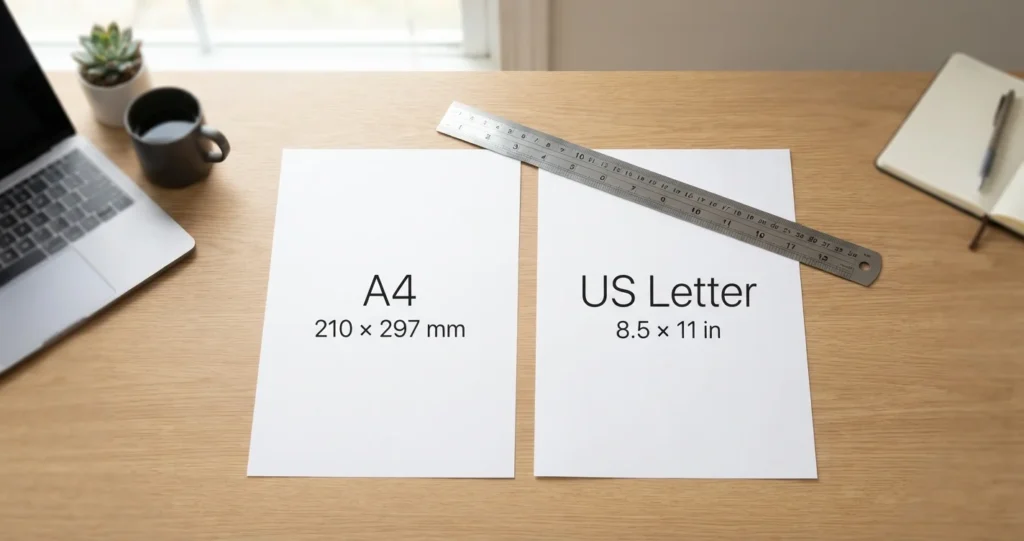
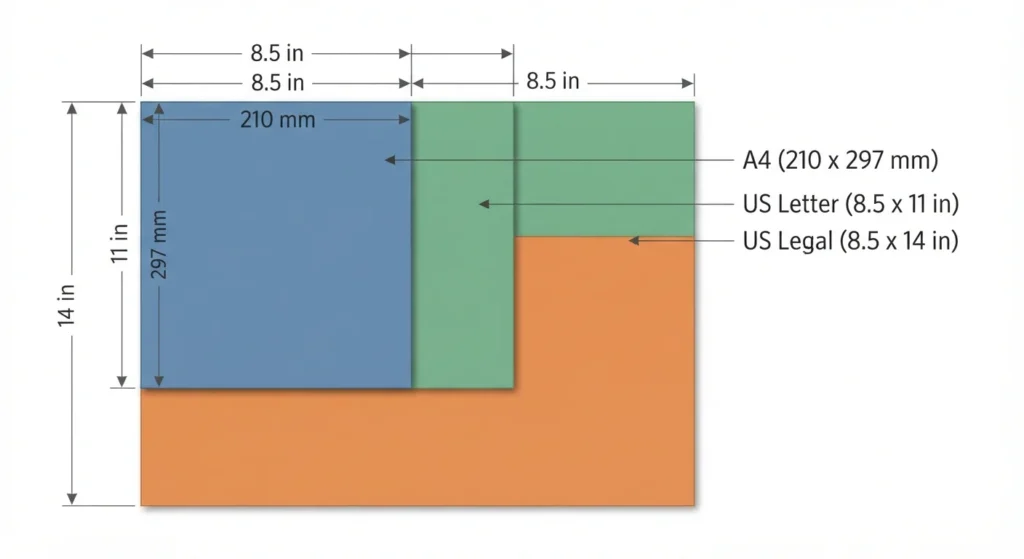
A4 and Letter are close in size, but they aren’t interchangeable. A4 measures 8.27 × 11.69 inches, while US Letter measures 8.5 × 11 inches. Letter is wider, but A4 is almost 0.7 inches taller. If your PDF uses A4 and your printer loads Letter paper, the bottom of the page may be clipped unless you choose a fit or shrink option.
A4 vs Letter at a glance
| Paper size | Inches | Millimeters | Common use |
|---|---|---|---|
| A4 | 8.27 × 11.69 | 210 × 297 | Most countries outside North America |
| US Letter | 8.5 × 11 | 215.9 × 279.4 | United States, Canada, and parts of Mexico |
| US Legal | 8.5 × 14 | 215.9 × 355.6 | Some contracts, court filings, and office forms |
The most important difference is height. A4 is about 0.69 inches, or 17.6 millimeters, taller than Letter. Letter is about 0.23 inches, or 5.9 millimeters, wider.
These dimensions match the ISO paper size reference from the University of Cambridge, which notes that A4 is about 6 mm narrower and 18 mm taller than US Letter.
Why a PDF loses an edge
A PDF has a defined page size. Your printer also has a selected paper size and a limited printable area. Those three things need to agree.
Suppose a document was created as A4 portrait:
- PDF page: 8.27 × 11.69 inches.
- Printer paper: 8.5 × 11 inches.
- Printer mode: Actual size.
The paper is wide enough, but it is not tall enough. The printer cannot place the entire 11.69 inch page on an 11 inch sheet. Depending on the software and printer driver, the result may be clipped, reduced, shifted, or divided across pages.
The reverse problem also occurs. A Letter PDF printed on A4 at Actual size can lose a thin strip on the left and right sides, because Letter is wider. With scaling, it fits, but the page becomes slightly smaller. Text may reflow if the file is regenerated rather than simply printed.
Adobe identifies the key distinction in its print instructions:
- Actual size prints without scaling, so content outside the selected paper can be cropped.
- Fit reduces or enlarges the page to fit the selected paper’s printable area.
- Shrink oversized pages reduces a page only when it is too large for the paper.
- Custom Scale lets you choose a specific percentage.
Choose the right PDF page size
Use the recipient’s printing environment, not only your own computer settings.
| Your situation | Recommended page size |
|---|---|
| Document will mainly print in the US | US Letter |
| Document will mainly print outside North America | A4 |
| International distribution | Ask the recipient or provide both versions |
| Technical drawing or form with fixed dimensions | Match the required specification exactly |
| Document meant for screen reading | Either size works, but use Letter if US readers may print it |
For a US business document, Letter is usually the safer default. For an international report, résumé, invoice, or academic submission, A4 may be required.
If the file will be printed in both regions, avoid putting essential text, signatures, borders, or page numbers close to the edge. A generous margin gives the printer room to scale without cutting important content.
How to print an A4 PDF on Letter paper
In Adobe Acrobat or Acrobat Reader:
- Open the PDF and choose Print.
- Select Letter as the printer paper size.
- Under Page Sizing & Handling, select Fit or Shrink oversized pages.
- Check the preview for clipped text, borders, footers, and page numbers.
- Print one test page before printing the full document.
In Chrome or Edge, open the print dialog, choose Letter as the paper size, then set Scale to Fit to printable area or Fit to page. In macOS Preview, select Scale to Fit in the print dialog. Expect the content to print at roughly 94% of its original size, a little less if your printer has wide margins.
Use Actual size only when preserving the exact physical dimensions matters and you know the PDF fits the loaded paper. Acrobat states that pages that do not fit under Actual size can be cropped.
If the document contains a scale drawing, label template, legal form, or measurement reference, fitting the page may change its physical scale. In that case, print a separate test and check a known measurement with a ruler.
How to convert the PDF itself
Printing with Fit changes the output size temporarily. It does not necessarily change the PDF’s stored page dimensions.
If you need a new Letter PDF:
- Open the original file in a layout application or PDF editor. In Word, go to Layout, then Size. In Google Docs, go to File, then Page setup.
- Change the document or page size to US Letter, 8.5 × 11 inches.
- Review page breaks, tables, images, headers, footers, and signature areas.
- Export a new PDF.
- Open the exported file and confirm its page size in the document properties.
A simple page size change can move one line onto a new page. That means pagination, internal references, and page numbers should be checked after conversion. If the new file is too large to email, you can compress PDF files before sharing the final document.
For a quick fix that only affects printing, Acrobat’s Fit option is usually enough. For a file you will send to clients, regenerate the PDF using the intended page size whenever possible.
Common mistakes
Choosing Letter paper but leaving the PDF set to A4
The printer may obey the PDF’s page size, the operating system’s page setup, or the application’s print settings. Check all three if the result is unexpected.
Using Actual size for a mismatched page
Actual size is not a universal “best quality” option. It preserves dimensions, but it cannot create physical space that the paper does not have.
Confusing Legal with Letter
US Legal is 8.5 × 14 inches. It is not the standard size for every legal document. Federal appellate briefs, for example, must be on 8½ × 11 inch paper under Federal Rule of Appellate Procedure 32. State and local court rules vary, so check the form or filing instructions instead of relying on the document’s purpose.
Ignoring the printer’s nonprintable margins
Even if the PDF and paper dimensions match, many home and office printers cannot print all the way to the edge. A border positioned at 0 inches may still be cut off.
Printing PDFs with mixed page sizes
A PDF can contain pages with different dimensions. For example, a report may contain Letter pages, an A4 attachment, and a Legal form. Use the preview and check each section rather than assuming one setting fits every page. This can also happen when you combine scanned pages into one PDF.
FAQ
Is A4 the same as Letter size?
No. A4 is 210 × 297 millimeters, or about 8.27 × 11.69 inches. US Letter is 215.9 × 279.4 millimeters, or 8.5 × 11 inches. Letter is wider, while A4 is taller. The difference is small on screen but large enough to affect page breaks, footers, borders, and printing.
What is A4 paper size in inches?
A4 is approximately 8.27 × 11.69 inches. Its official dimensions are 210 × 297 millimeters. The inch conversion is rounded, so use the millimeter values when creating production files, technical drawings, forms, or templates that require precise dimensions.
What are US Letter dimensions?
US Letter measures 8.5 × 11 inches, or 215.9 × 279.4 millimeters. It is the standard office paper size in the United States. In word processors and PDF tools, it may appear as Letter, US Letter, or ANSI A.
Why does my PDF print with a missing edge?
The most common reason is a page size mismatch. An A4 PDF is taller than Letter paper, so printing it at Actual size can crop the bottom. A border may also be outside the printer’s printable area. Select the correct paper size and use Fit or Shrink oversized pages if preserving every edge is more important than maintaining exact scale.
How do I print an A4 PDF on Letter paper?
Select Letter in the printer settings, then choose Fit or Shrink oversized pages in the PDF print dialog. Review the preview before printing. The document will be reduced to roughly 94% to fit the shorter Letter page. If the PDF includes measurements, labels, or a form that must remain exact size, verify the result with a ruler.
Should I use A4 or Letter for a PDF?
Use Letter for documents primarily intended for US readers and printers. Use A4 for most international recipients or when a submission guide specifically requires it. If you don’t know where the document will be printed, keep comfortable margins and ask the recipient which format they need. For important documents, create separate A4 and Letter exports. You can also use XYConvert PDF tools when preparing files for sharing or printing.
Can I convert A4 to Letter without changing the layout?
Not always. Scaling an A4 page to Letter can preserve the complete visual layout, but it makes the content slightly smaller. Changing the page size without scaling can alter line breaks, page count, and footer placement. Choose between exact physical scale and complete content coverage based on the document’s purpose.