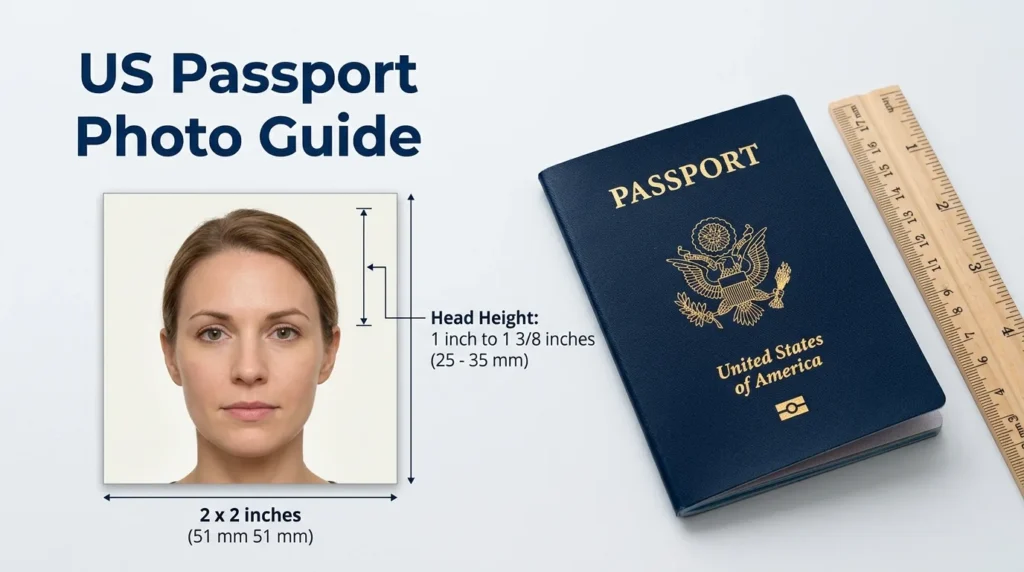
A US passport photo must be 2 x 2 inches (51 x 51 mm). It must be in color, taken within the last 6 months, against a plain white or off-white background, and show your full face.
Your head should measure 1 inch to 1 3/8 inches from the bottom of your chin to the top of your head. The picture should be clear and unedited, with your face looking straight at the camera and your eyes open.
Quick Answer: The 7 US Passport Photo Rules
| Rule | What you need |
|---|---|
| 1. Photo size | 2 x 2 inches (51 x 51 mm) |
| 2. Head height | 1 inch to 1 3/8 inches (25 to 35 mm), chin to top of head |
| 3. Photo age | In color and taken within the last 6 months |
| 4. Background | Plain white or off-white, with no shadows |
| 5. Expression | Neutral expression or natural smile, eyes open, mouth closed |
| 6. Glasses and hats | Remove them unless you have a documented medical or religious reason |
| 7. No edits | The original photo, with no filters or digital changes |
Key takeaway: Use one recent color photo, printed at exactly 2 x 2 inches, with your head centered and fully visible. Avoid shadows, filters, hats, and glasses unless you have a documented medical or religious exception.
Why the 2 x 2 Inch Rule Matters
The US government uses your passport photo to confirm your identity.
A photo that is too large, too small, blurry, shadowed, or edited can delay your application. The US Department of State says unacceptable photos are the most common reason it puts passport applications on hold. If that happens, you may be asked to submit a new photo.
That can be frustrating, especially if you are trying to travel soon. The good news is that the requirements are simple once you know the measurements.
US Passport Photo Size Requirements
In short, your photo must be 2 x 2 inches (51 x 51 mm), in color, and taken within the last 6 months. Your head must measure between 1 inch and 1 3/8 inches from chin to top of head, and the background must be plain white or off-white.
Your photo must show your full face, looking directly at the camera. Your eyes should be open, the image should be clear and unedited, and the background must be free from shadows.
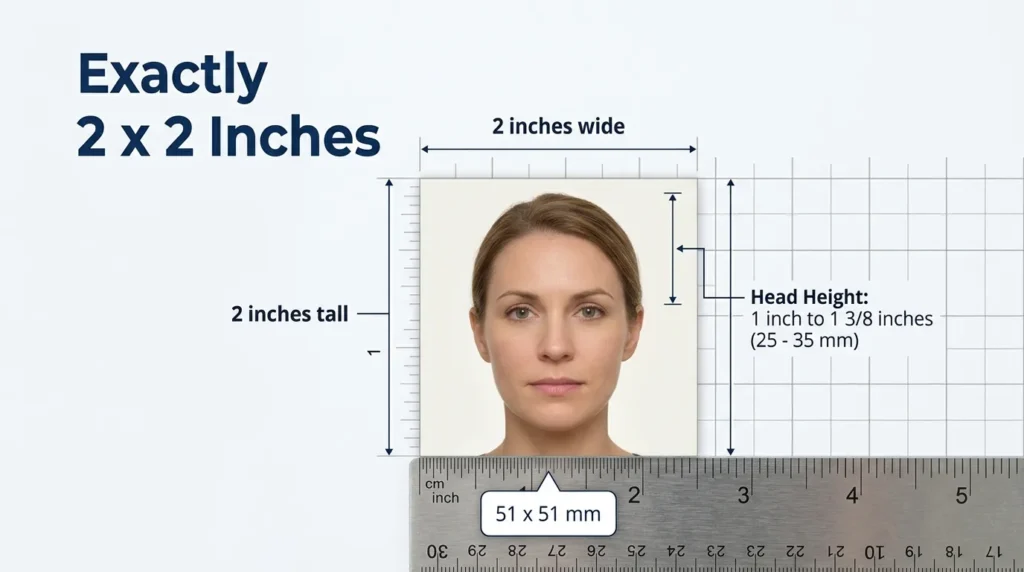
Head Measurement
Your head must be the right size within the photo.
Measure from the bottom of your chin to the top of your head. The distance must be:
- Minimum: 1 inch
- Maximum: 1 3/8 inches
- Metric equivalent: 25 mm to 35 mm
Your head should be centered. Do not tilt it, turn it, or look away from the camera.
You do not need to show your ears. Your head, neck, and part of your shoulders should be visible.
Photo Quality Requirements
A passport photo must look like you, not like a filtered social media picture.
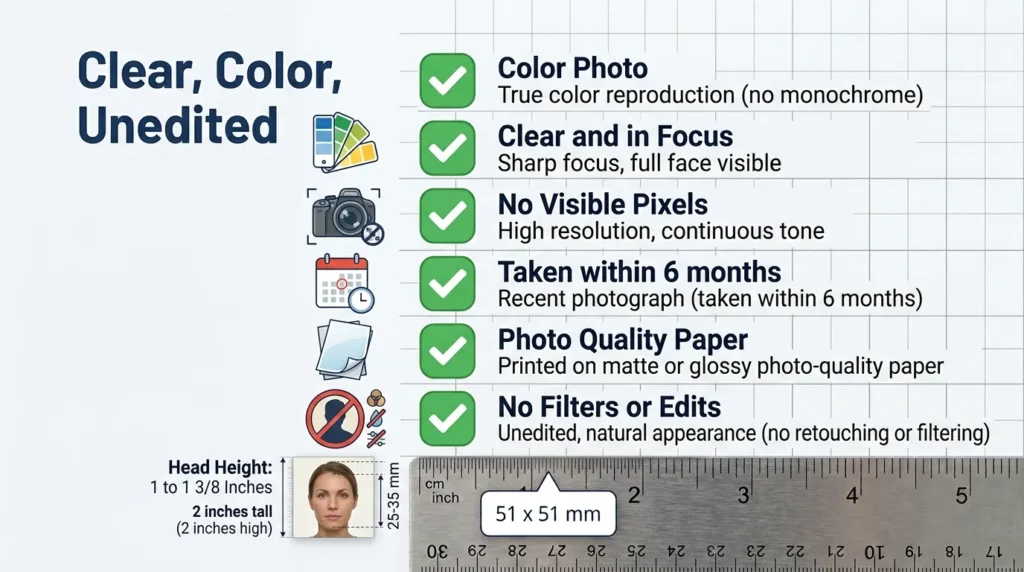
Your photo must be:
- In color
- Clear and in focus
- Free from visible pixels or printer dots
- Taken within the last 6 months
- Printed on matte or glossy photo-quality paper
- Unedited, with no filters or digital changes
Avoid using a photo copied from a driver’s license, social media profile, magazine, or another official document. Those images often lose quality and may not meet the rules.
If you are uploading a digital photo for online renewal, use a sharp original image. Do not scan a printed photo or take a picture of a printed photo. That can create glare, blur, or visible printer dots.
Background Requirements
The background must be plain white or off-white.
A plain wall works well. A white bedsheet can work too, but only if it is smooth and free from shadows. Stand a few feet in front of the wall so your body does not cast a shadow on it.
Your background must not have:
- Shadows
- Patterns
- Texture
- Lines
- Objects
- Other people
Many home photos go wrong with the lighting. If one side of your face is light and the other is dark, retake the photo. Face a window or use even lighting from the front.
How to Take a Passport Photo at Home
Yes, you can take a US passport photo at home. All you need is good, even lighting, a plain white background, and someone to take the picture.
Step 1: Find a Plain Background
Stand a few feet in front of a white or off-white wall. Remove anything behind you that could appear in the photo or cast a shadow.
Step 2: Set Up Even Lighting
Face a window if possible. Avoid strong overhead light, direct sunlight, and lamps that create shadows under your eyes or nose.
Step 3: Position the Camera
Place the camera at eye level. Keep it several feet away, then crop closer if needed.
Do not tilt the camera upward or downward.
Step 4: Face the Camera
Look directly into the lens. Keep both eyes open and visible.
Use a neutral expression or a natural smile. Keep your mouth closed and avoid showing your teeth.
Step 5: Check Your Appearance
Remove glasses unless you have a documented medical reason to wear them. Remove headphones, Bluetooth earpieces, and anything covering your face. Jewelry and facial piercings are fine as long as they do not hide your face.
Wear normal everyday clothing. Do not wear a uniform, clothing that looks like a uniform, or camouflage.
Step 6: Print at Actual Size
Print one copy at exactly 2 x 2 inches on photo-quality paper.
Before submitting it, measure the printed photo. If it is even slightly off, reprint it.
DS-11 Photo Requirements
When applying for a new passport in person, you will complete Form DS-11.
For a DS-11 application, you need one color passport photo that meets the same 2 x 2 inch rules. The same applies if you renew by mail with Form DS-82.
You can bring your own photo, or have one taken at a passport acceptance facility that offers photo services, including many USPS locations. Not every location offers this service, so check before you go.
Do not staple, fold, bend, or write on the photo unless the application instructions tell you to.
Glasses, Hats, and Head Coverings
These rules cause the most confusion.
Glasses
In most cases, remove your glasses.
This includes prescription glasses. Eyeglasses are not allowed in US passport photos unless you have a documented medical reason. Do not rest them on top of your head either.
If you cannot remove your glasses for medical reasons, include a signed note from your doctor with your application. The glasses must not block your eyes, create glare, or cast shadows.
Sunglasses and tinted glasses are not acceptable.
Hats and Head Coverings
Remove hats and head coverings for your photo.
There are two exceptions. If you wear a head covering daily for religious reasons, submit a signed statement confirming it is religious attire worn daily in public. If you wear one for medical reasons, submit a signed statement from your doctor.
In either case, your full face must be visible, and the covering must not cast shadows on your face. It should be a single color, without patterns or small holes.
Hair and Facial Hair
You can wear your hair as you normally do, as long as it does not cover your face or eyes.
Facial hair is allowed. Head size is still measured from the bottom of your chin to the top of your head.
Passport Photo Rules for Children
Children’s passport photos follow the same basic size rules, but getting a baby or toddler to cooperate can be tricky.
The child must be the only person in the photo. No parent’s hands, shoulders, or face should be visible.
For babies, lay them on a plain white or off-white sheet. You can also cover a car seat with a white sheet and photograph your baby in the seat. If you support their head from behind, make sure your hand is not visible in the photo.
The child should:
- Face the camera directly
- Have both eyes open (a baby’s eyes do not need to be fully open)
- Have a neutral expression
- Be photographed against a plain background, with no shadows on the face
For very young babies, perfect eye contact is not always realistic. Do your best to get the child facing the camera with the face clearly visible.
Digital Photo Requirements for Online Renewal
If you are renewing online, you upload a digital photo instead of mailing a printed one.
Your digital photo should still meet the same appearance rules:
- Color photo
- Taken within 6 months
- Plain white or off-white background
- Full face visible
- No filters or edits
- No glasses unless medically necessary
- No shadows or glare
The file should be a JPG, JPEG, PNG, HEIC, or HEIF image between 54 KB and 10 MB. Photos taken on a phone often save in one of these formats automatically.
Use the original photo file when possible. Avoid screenshots, scans of printed photos, or images that have been heavily compressed by messaging apps. Sending the photo to yourself by text message can lower its quality.
If you are unsure, leave a little extra space around your head and shoulders. You can crop and reposition the photo in the online application, but do not alter your facial features or background. The State Department’s digital photo guidelines show acceptable and unacceptable examples.
Common Passport Photo Mistakes
These are the issues that most often cause problems:
| Mistake | How to avoid it |
|---|---|
| Printing at the wrong size | Always select actual size, not fit to page. |
| Wearing glasses | Remove them unless you have a documented medical exception. |
| Using a shadowed background | Step away from the wall and use softer light. |
| Tilting the head | Keep your face square to the camera. |
| Using a selfie | Have someone else take the photo or use a tripod. |
| Applying filters | Use the original, unedited image. |
| Editing the background | Do not use background removal tools. Fix your lighting and background, then retake the photo. |
| Using an old photo | It must be from the last 6 months. |
| Wearing a uniform | Daily religious clothing is an exception, but work uniforms are not. |
A little preparation prevents a lot of delay.
If your photo needs a simple crop before printing, these free image tools that run in your browser handle it without uploading anything. Use them to crop only. Do not remove, replace, or whiten the background.
Where to Get a Passport Photo
You have several options.
You can take one at home, visit a passport acceptance facility, or use a photo service at many USPS locations. Many pharmacies, shipping stores, and photography studios also offer passport photos.
If you take one at home, print it on photo-quality paper at exactly 2 x 2 inches. If you use a service, ask them to confirm that the photo meets current US passport requirements.
For online renewal, make sure you have a high-quality digital original. A printed photo scanned afterward may not meet the digital upload standards.
Passport Photo Checklist
Use this checklist before you submit anything:
| Checklist item | Done |
|---|---|
| One color photo | ☐ |
| Taken within the last 6 months | ☐ |
| Printed at 2 x 2 inches | ☐ |
| Head height between 1 inch and 1 3/8 inches | ☐ |
| Plain white or off-white background | ☐ |
| No shadows on the face or background | ☐ |
| Full face visible | ☐ |
| Both eyes open | ☐ |
| Neutral expression or natural smile, mouth closed | ☐ |
| No glasses unless medically necessary (with a doctor’s note) | ☐ |
| No hat unless worn for religious or medical reasons (with a signed statement) | ☐ |
| No filters or digital edits | ☐ |
| Printed on photo-quality paper | ☐ |
If every box is checked, your photo should be ready.
Frequently Asked Questions
What size is a US passport photo?
A US passport photo must be exactly 2 x 2 inches, or 51 x 51 mm. Your head must measure between 1 inch and 1 3/8 inches from chin to top of head.
Can I take a US passport photo at home?
Yes. Use a plain white or off-white background, even lighting, and have someone else take the photo or use a tripod. Print it at actual size on photo-quality paper.
Can I wear glasses in a US passport photo?
Usually no. Remove prescription glasses unless you have a documented medical reason, in which case include a signed note from your doctor. Sunglasses and tinted glasses are not allowed.
Can I smile in a passport photo?
Yes, but keep it natural. A neutral expression or a natural smile is acceptable as long as your mouth is closed. Avoid showing your teeth.
Can I wear a hijab or religious head covering?
Yes, if you wear it daily for religious reasons. Include a signed statement confirming this with your application. Your full face must be visible, and the covering must not cast shadows on your face.
What happens if my passport photo is rejected?
The passport agency may ask you to submit a new photo. This can delay your application, so check the size, background, lighting, and head measurement before submitting.
Final Review
A US passport photo is simple once you follow the basics: 2 x 2 inches, taken within 6 months, plain background, full face visible, and no filters.
Take your time with lighting and printing. A clear, tested, unedited photo is the safest way to avoid delays with your passport application. Rules can change, so check the official passport photo guidelines before you submit.
Need to turn a signed form or a scan into a PDF as well? XY Convert’s free file tools work on your own device, so nothing is uploaded.