
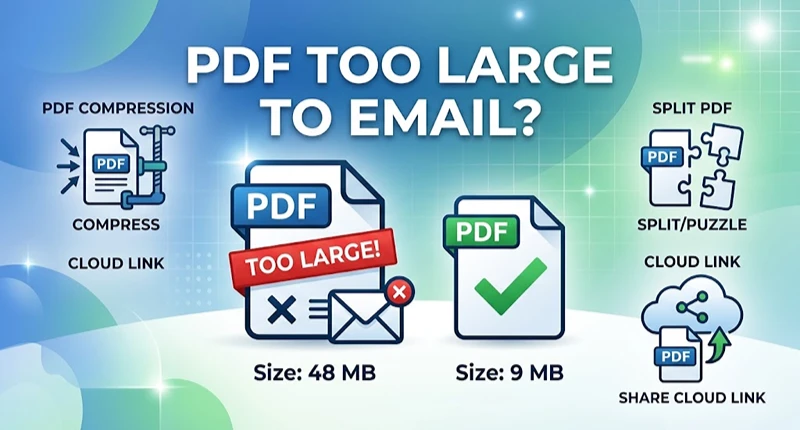
If your PDF is too large to email, you have three real fixes. You can compress the file. You can split it into parts. Or you can send a cloud link instead of an attachment. Gmail and Outlook.com both cap a message at 25 MB, and encoding overhead eats roughly a third of that, so aim for about 18 MB of actual file.
That last number is the part most guides skip, and it’s why a 24 MB PDF still gets rejected by a service that claims to allow 25 MB.
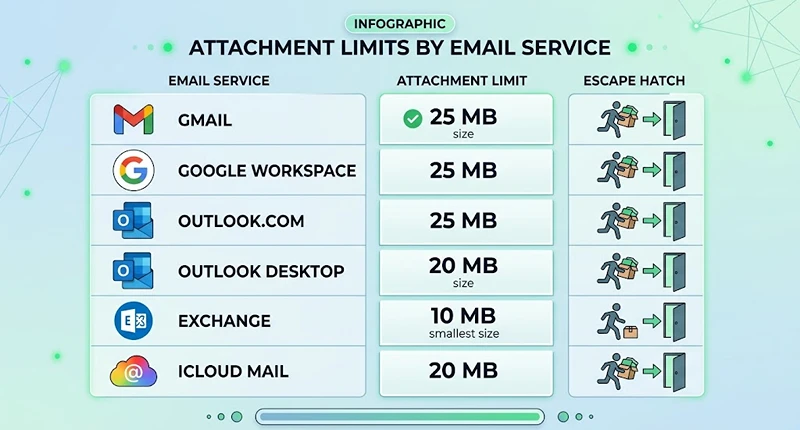
Attachment limits by email service
Every limit below covers the whole message: attachments, body text, signature, and inline images.
| Email service | Sending limit | What happens when you exceed it | Escape hatch |
|---|---|---|---|
| Gmail (personal) | 25 MB | Gmail strips the file and inserts a Google Drive link | Google Drive |
| Google Workspace | Set by your admin, commonly 25 MB | Drive swap, or a block on a lower cap | Google Drive |
| Outlook.com | 25 MB | Send fails with an error | OneDrive link, up to 2 GB |
| Outlook desktop, internet account | 20 MB | “The file you’re attaching is bigger than the server allows” | OneDrive, SharePoint |
| Exchange or work mailbox | 10 MB default, admin configurable | Bounces at the server | OneDrive, SharePoint |
| iCloud Mail | 20 MB | Mail offers Mail Drop | Mail Drop, 5 GB, expires in thirty days |
Sources: Google’s Gmail attachment help page, Microsoft’s guide to reducing attachment size in Outlook, and Apple’s iCloud Mail sending limits.
The encoding tax nobody mentions
Email can’t carry raw binary data, so your PDF is converted to Base64 text before it leaves your outbox, which inflates it by roughly 33 percent. A 20 MB PDF hits the server weighing close to 27 MB. The rule: multiply your file size by 1.33. If the result clears your limit, you’re fine. On a 25 MB service, that means staying under about 18 MB.
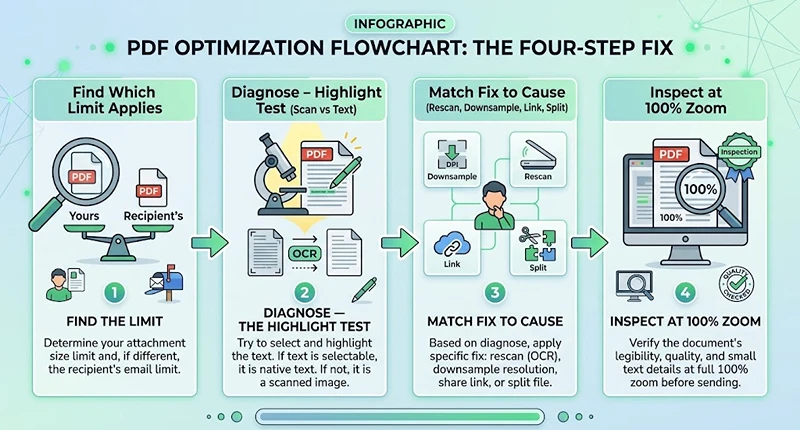
A four step fix
1. Find out which limit actually applies. Two limits govern every message, yours and the recipient’s, and the smaller one wins. You can send 30 MB from a generous corporate mailbox and still bounce because the recipient’s server tops out at 10 MB.
2. Diagnose why the PDF is so big. Try to highlight a line of text with your cursor. If nothing highlights, you have a scan, meaning every page is a photograph rather than text. Color scans routinely run 2 MB to 5 MB per page. If text does highlight, the bloat is embedded images, embedded fonts, or leftover editing data.
3. Match the fix to the cause.
- Scanned document: rescan at 300 dpi in grayscale, or use a compressor that rebuilds the page images. Reductions of 60 to 90 percent are common.
- Image heavy but text based: downsample images to 150 dpi, plenty for screen viewing.
- Already lean and still oversized: stop compressing and send a link.
- Headed for a filing: split into labeled parts rather than degrading quality.
4. Inspect before you send. Open the compressed copy at 100 percent zoom and read the smallest text on the busiest page. Compression that looks fine in a thumbnail can turn a signature into mush.
What usually goes wrong
Zipping barely helps. PDFs already compress their own contents, so a zip typically returns single digit savings. Zip to bundle documents, not to shrink one.
Cloud links break. A link is not a copy. Delete the original, move it, or change permissions, and every email pointing to it goes dead. Keep the file in place until the recipient confirms the download, and set permissions deliberately. A link that demands an account your recipient lacks is the same as no link.
Splitting breaks navigation. Bookmarks, internal links, and page numbering often do not survive a split. Label the parts, for example “Part 1 of 3,” and say what’s in each one in the email body.
Free compressors upload your document. Most browser tools send your file to a third party server. Fine for a brochure, a problem for medical records, tax returns, or client files. Use desktop software when contents are sensitive, and if you handle protected health information or privileged material, ask your compliance officer or attorney rather than guessing.
Portal limits vary by system, not by one national number
If the PDF is headed for a government portal instead of an inbox, that system sets the cap, and the numbers are all over the map. Federal district courts set their own ceilings inside CM/ECF: the Central District of California caps filings at 35 MB per PDF, and the District of Nebraska allows 35 MB after retiring a 10 MB limit. Michigan’s state courts cap most filings at 25 MB. Find your number in the portal’s help section or local rules before you build the file, because a rejection at 4:55 p.m. on a deadline day is an expensive way to learn.
Portal rejections rarely explain themselves. You will usually see a generic line about the file exceeding the maximum allowed size, with no indication of whether the cap applies to that document or to the full submission. If the upload fails without an error at all, the connection timed out before the file finished, which is a different problem and usually means splitting rather than compressing.
Frequently asked questions
Why is my PDF file so large?
Usually because it’s a scan. Each page is stored as a full page image, so twenty color pages at 300 dpi can top 40 MB. Text based PDFs bloat for other reasons: high resolution photos, embedded font files, editing history, and metadata. The highlight test tells you which problem you have in two seconds.
What is the maximum PDF size you can email?
There’s no universal number. Gmail and Outlook.com allow 25 MB per message, desktop Outlook with an internet account defaults to 20 MB, iCloud Mail allows 20 MB, and many corporate Exchange mailboxes default to 10 MB. Because encoding adds about a third, treat 18 MB as your safe ceiling on a 25 MB service.
How do I reduce the size of a PDF so I can email it?
On a Mac, open it in Preview, choose File then Export, and apply the Reduce File Size Quartz filter. On Windows, use Acrobat’s Save as Other then Reduced Size PDF, or a browser tool. For scans, rescanning in grayscale at 300 dpi usually beats any compressor. Keep the original either way.
Does zipping a PDF make it smaller?
Rarely by much. PDF already compresses its own streams, so a zip typically returns a few percent. The exception is a file built from uncompressed image data, where zipping still helps. Use it to bundle several documents into one attachment, not for real size reduction.
Will compressing a PDF ruin the quality?
It can. Image compression is lossy, so detail is discarded permanently. Body text usually survives and stays readable. Signatures, handwriting, fine print, stamps, and detailed charts degrade first. Compress a copy, inspect the worst page at full zoom, and leave the original untouched.
Why did my email bounce even though the file was under the limit?
Three likely causes: the recipient’s server has a lower cap than yours, encoding pushed the message past the line, or your own mailbox storage is full, which blocks sending on some services. The bounce message normally states the exact limit that rejected you, so read it before retrying.
What to do next
- Run the highlight test to see whether you’re fighting a scan or a layout problem.
- Compress a copy in Adobe Acrobat, xyconvert, or Mac Preview, then inspect at full zoom.
- If it still won’t fit, share a Google Drive, OneDrive, or Dropbox link with permissions set correctly.
- Confirm your exact cap on the official pages linked above before rebuilding the file twice.